

 By Kaustubh Saini
You already use operators every time you write code. The * in price * qty, the == in if answer == "yes", the + that joins two strings, all of them are operators. They're the symbols that do the actual work in an expression.
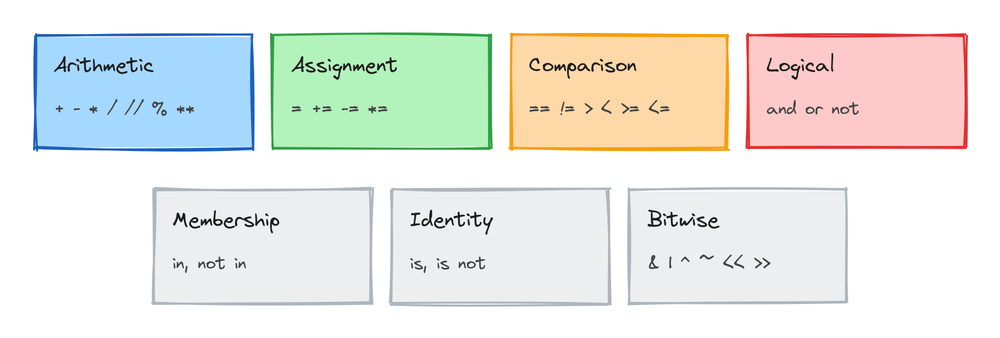
Python operators are symbols that perform an action on values, like adding, comparing, or combining them. Python groups them into seven families: arithmetic, assignment, comparison, logical, membership, identity, and bitwise. This lesson goes through each family with runnable examples, then covers the order Python applies them in, which is where most operator bugs hide.
What an operator is
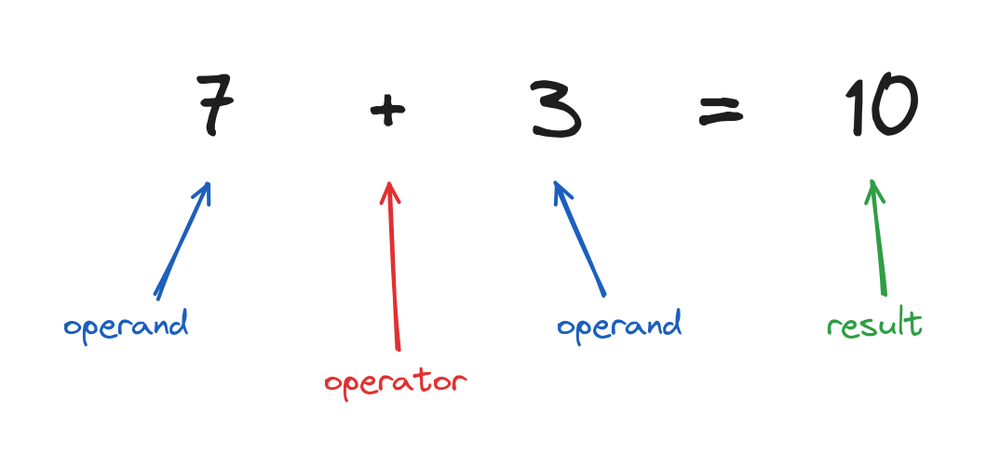
An operator acts on values. The values are called operands, and the whole thing together is an expression:
print(7 + 3)
# Output: 10
Here 7 and 3 are the operands, + is the operator, and 10 is the result. Every family below works the same way, only the action changes.
Arithmetic operators
These do maths. Five of them you know from school, and three need a closer look:
print(7 + 3)    # add
print(7 - 3)    # subtract
print(7 * 3)    # multiply
print(7 / 2)    # divide
print(7 // 2)   # floor divide (throw away the decimal part)
print(7 % 2)    # modulus (the remainder)
print(2 ** 3)   # power
# Output:
# 10
# 4
# 21
# 3.5
# 3
# 1
# 8
The three that need attention:
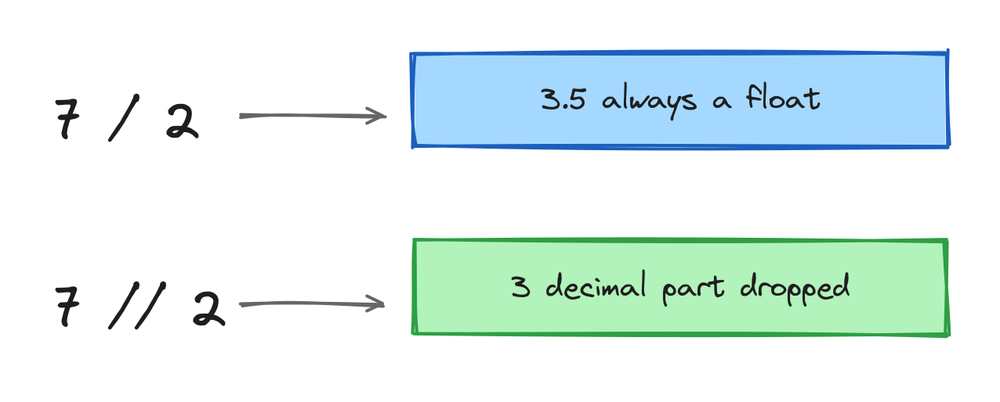
/ always returns a float, even when the division is exact. 10 / 5 is 2.0, not 2. If you want a whole number, use //:
print(10 / 5)
print(10 // 5)
# Output:
# 2.0
# 2
% gives the remainder after division, and its most famous job is checking whether a number is even:
n = 14
print(n % 2 == 0)
# Output: True
** is power. 2 ** 10 is 1024. It also handles roots: 25 ** 0.5 is 5.0, the square root.
Assignment operators
The plain = stores a value in a variable. Every arithmetic operator has a shorthand that updates a variable in place:
score = 10
score += 5     # same as score = score + 5
print(score)
score *= 2     # same as score = score * 2
print(score)
# Output:
# 15
# 30
The full set is +=, -=, *=, /=, //=, %=, and **=. The one you'll type most is += 1, for counting:
count = 0
count += 1
count += 1
print(count)
# Output: 2
Comparison operators
These ask a question about two values and return a boolean, True or False:
print(5 == 5)    # equal
print(5 != 3)    # not equal
print(5 > 3)     # greater than
print(5 < 3)     # less than
print(5 >= 5)    # greater or equal
print(5 <= 4)    # less or equal
# Output:
# True
# True
# True
# False
# True
# False
Python has a feature most languages don't: comparisons chain. You can write a range check the way you'd write it in maths:
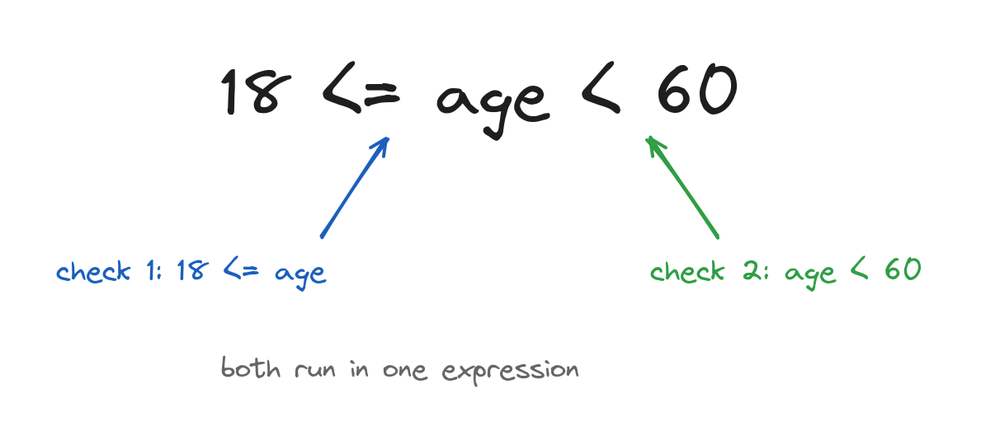
age = 25
print(18 <= age < 60)
# Output: True
That one line checks both ends of the range. No and needed.
Logical operators
and, or, and not combine boolean answers into bigger conditions:
age = 22
student = True

print(age > 18 and student)    # both sides must be True
print(age > 30 or student)     # one side is enough
print(not student)             # flips the value
# Output:
# True
# True
# False
Python is lazy about these, in a good way. With and, if the left side is False, the right side never runs, because the answer is already known. Same for or when the left side is True. This is called short-circuiting, and it lets you write safe checks like if items and items[0] == "a":, where the second part only runs when the list has something in it.
Membership operators
in and not in check whether a value is inside a container, like a string or a list:
print("py" in "python")
print(5 in [1, 3, 5])
print("z" not in "abc")
# Output:
# True
# True
# True
This reads like English and replaces a whole loop. Checking if a letter is in a word, a word is in a sentence, or an item is in a list is one operator instead of five lines.
Identity operators
is and is not ask a different question than ==. == asks "are the values equal?", is asks "are these the exact same object in memory?":
a = [1, 2, 3]
b = [1, 2, 3]

print(a == b)    # same values
print(a is b)    # same object?
# Output:
# True
# False
The two lists hold equal values, but they're two separate lists. As a beginner you need is in exactly one place, checking for None:
result = None
print(result is None)
# Output: True
For everything else, use ==.
Bitwise operators
The last family works on numbers one binary digit at a time: &, |, ^, ~, <<, and >>. A taste:
print(6 & 3)    # binary AND
print(6 | 3)    # binary OR
print(6 << 1)   # shift left (doubles)
# Output:
# 2
# 7
# 12
Don't confuse & with and, they do different things. Bitwise operators get a full lesson of their own, linked at the end, so here it's enough to recognize them.
Operator precedence
When an expression has several operators, Python applies them in a fixed order, just like the BODMAS rule from school. Multiplication before addition:
print(2 + 3 * 4)
print((2 + 3) * 4)
# Output:
# 14
# 20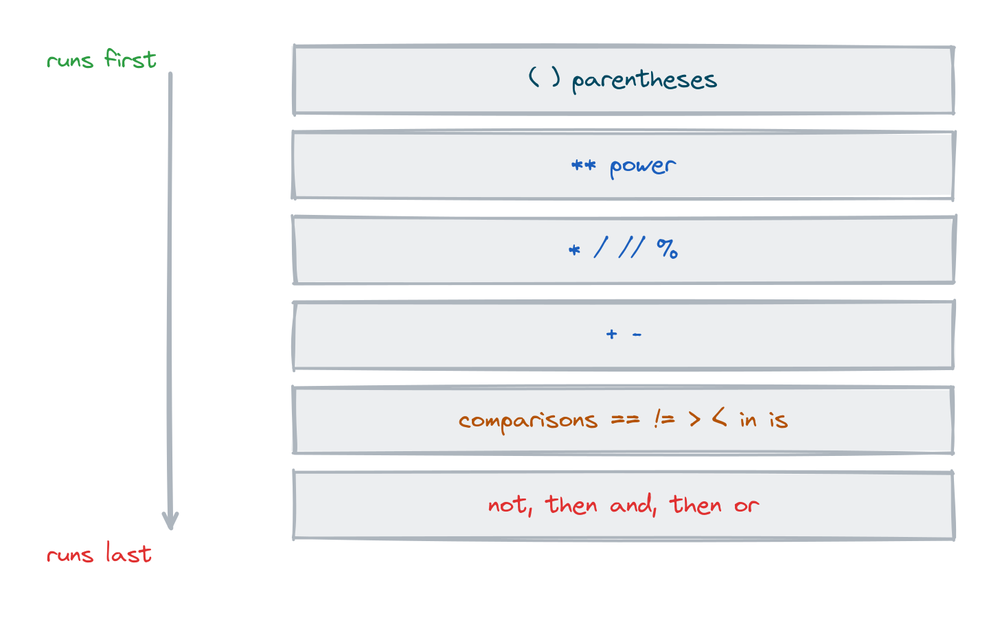
The order for the operators in this lesson, from first to last:
- Parentheses
( ) - Power
** - Multiply, divide, floor divide, modulus
*///% - Add, subtract
+- - Comparisons
==!=><>=<=, membershipin, identityis not, thenand, thenor
One extra surprise: ** works right to left. 2 ** 3 ** 2 means 2 ** (3 ** 2), which is 2 ** 9:
print(2 ** 3 ** 2)
# Output: 512
You don't need to memorize the whole table. When you're unsure, add parentheses. They cost nothing and make the code readable for the next person too.
Operators on strings and lists
+ and * have a second job. On strings and lists, + joins and * repeats:
print("fav" + "tutor")
print("ha" * 3)
print([0] * 4)
# Output:
# favtutor
# hahaha
# [0, 0, 0, 0]
The repeat trick is a quick way to draw a divider line in the terminal: print("-" * 30). But + won't join a string to a number. For mixing values into text, use an f-string, covered in Python string formatting.
Practice exercises
Try each one before you look at the solution.
Predict the maths
Without running it, work out what 17 // 5 and 17 % 5 print. Then run them.
# Solution
print(17 // 5)
print(17 % 5)
# Output:
# 3
# 2
Fix the division type
bill = 500 / 5 gives a float. Change one character so it gives the integer 100.
# Solution
bill = 500 // 5
print(bill)
# Output: 100
Write a range check in one comparison
Check that marks = 76 is between 40 and 100, ends included, in a single chained comparison.
# Solution
marks = 76
print(40 <= marks <= 100)
# Output: True
Membership test
Check if the letter "u" appears in "favtutor" without a loop.
# Solution
print("u" in "favtutor")
# Output: True
Precedence puzzle
Predict what 10 - 2 * 3 ** 2 prints, then run it.
# Solution
print(10 - 2 * 3 ** 2)
# Output: -8
Common mistakes
- Using
=when you mean==. One sign assigns, two compare.if x = 5:is a SyntaxError. - Expecting
/to give an integer. It always gives a float.10 / 5is2.0. Use//for whole numbers. - Using
isto compare values.ischecks whether two names point at the same object, and it can look right in small tests and fail later. Compare values with==, and keepisforNone. - Negative numbers with
//and%. Python floors downward, so-7 // 2is-4, and-7 % 2is1. Other languages answer differently, so double-check code you translate. - Forgetting that
**goes right to left.2 ** 3 ** 2is 512, not 64. - Confusing
&withand.&is bitwise and works on the binary digits of numbers. For conditions, you wantand.
Frequently asked questions
What are the 7 types of operators in Python?
Arithmetic (+ - * / // % **), assignment (= += and friends), comparison (== != > <), logical (and or not), membership (in), identity (is), and bitwise (& | ^ ~ << >>).
What's the difference between / and // in Python?
/ is true division and always returns a float. // is floor division: it drops the decimal part and rounds down. 7 / 2 is 3.5, 7 // 2 is 3.
What does % do in Python?
It returns the remainder of a division. 7 % 2 is 1. The classic use is n % 2 == 0 to check whether a number is even.
What's the difference between == and is?
== compares values, is compares identity, whether both names point at the very same object. Use == for comparisons and is only for None.
What does ** mean in Python?
Power. 2 ** 3 is 8. It groups right to left, so 2 ** 3 ** 2 is 2 ** 9, which is 512.
Can I chain comparisons in Python?
Yes. 18 <= age < 60 checks both conditions at once, the same way you'd write it in maths. It equals 18 <= age and age < 60.
What does += mean?
Update in place. x += 5 is short for x = x + 5. Every arithmetic operator has this form: -=, *=, /=, and so on.
What is the walrus operator?
:=, added in Python 3.8. It assigns a value inside an expression, like if (n := len(items)) > 5:. It's handy but optional, and you can write Python for years without it.
Key takeaways
- Operators are the action symbols of Python, grouped into seven families.
/always returns a float;//floors;%gives the remainder;**is power and groups right to left.- Comparisons return booleans and can chain:
18 <= age < 60. and,or,notbuild conditions;inchecks membership;isis forNoneonly.- Python follows a fixed precedence order. When in doubt, add parentheses.
The one family this lesson only touched is the binary one. If you want to see what &, |, and the shifts actually do to a number's bits, continue with Python bitwise operators.