

 By Kaustubh Saini
Say you're keeping track of the fruits you need to buy. You could make a separate variable for each one: fruit1 = "apple", fruit2 = "banana", and so on. That gets messy fast. What you want is one thing that holds all of them, in order, that you can add to and change later. That thing is a list.
A list stores many values in one place, kept in the order you put them. It's the data type you'll use most in Python. This lesson shows you how to make a list, read items out of it, change it, add and remove items, loop over it, and avoid the one copying mistake that confuses almost every beginner.
What a list is
A list is an ordered collection of items. You write it inside square brackets, with commas between the items:
fruits = ["apple", "banana", "cherry"]
print(fruits)
# Output: ['apple', 'banana', 'cherry']
Three things are true about every list. It's ordered, so the items stay in the order you wrote them. It's changeable, so you can add, remove, or replace items after you make it. And it allows duplicates, so the same value can appear more than once.
A list can also hold different types at the same time. Numbers, text, and booleans can all sit in one list:
mixed = [1, "hi", 3.5, True]
print(mixed)
# Output: [1, 'hi', 3.5, True]

dups = [2, 2, 3]
print(dups)
# Output: [2, 2, 3]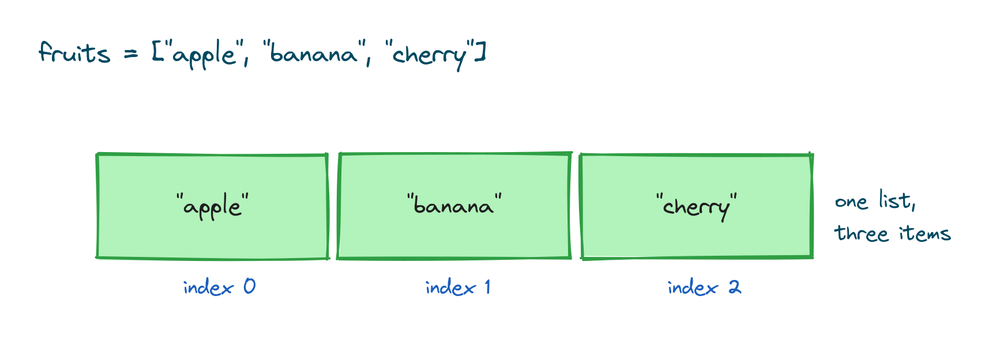
Think of a list as a row of boxes. Each box holds one item, and the boxes stay in a fixed order until you change them.
How to create a list in Python
The common way is square brackets. An empty list is just []:
empty = []
print(empty)
# Output: []

fruits = ["apple", "banana", "cherry"]
print(fruits)
# Output: ['apple', 'banana', 'cherry']
There's a second way, the list() function. You use it to turn another collection into a list. Pass it a tuple and you get a list back:
nums = list((1, 2, 3))
print(nums)
# Output: [1, 2, 3]

letters = list("cat")
print(letters)
# Output: ['c', 'a', 't']
Notice what list("cat") did. It split the text into single characters. That's a handy trick when you need each letter on its own. For a normal list you type yourself, use square brackets. Keep list() for converting something you already have.
Reading items by their position
Each item in a list has a position number, called its index. Python counts from 0, not 1. So the first item is at index 0, the second at index 1, and so on. You read an item by putting its index in square brackets after the list name:
colors = ["red", "green", "blue"]
print(colors[0])
# Output: red

print(colors[2])
# Output: blue
You can also count from the end using negative numbers. Index -1 is the last item, -2 is the one before it. This saves you from working out the length first:
colors = ["red", "green", "blue"]
print(colors[-1])
# Output: blue

print(colors[-2])
# Output: green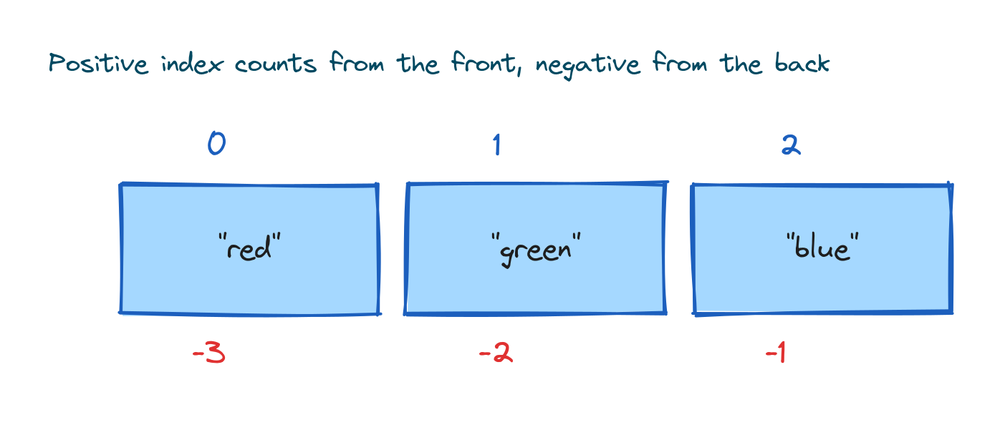
If you ask for an index that doesn't exist, Python stops with an error:
colors = ["red", "green", "blue"]
print(colors[5])
# IndexError: list index out of range
This is one of the most common beginner errors. A list of three items has indexes 0, 1, and 2. There is no index 3, and no index 5.
Slicing a list
A slice pulls out a section of the list. You give a start index and a stop index with a colon between them. The start is included, the stop is not:
n = [10, 20, 30, 40, 50]
print(n[1:4])
# Output: [20, 30, 40]

print(n[:2])
# Output: [10, 20]

print(n[3:])
# Output: [40, 50]
Leave out the start and it begins at 0. Leave out the stop and it goes to the end. You can add a third number for the step, so n[::2] takes every second item:
n = [10, 20, 30, 40, 50]
print(n[::2])
# Output: [10, 30, 50]
Slicing follows the same rules for lists and strings. For the full set of tricks, including reversing with a negative step, see the guide to Python string slicing. Everything there works on lists too.
Changing an item
Because a list is changeable, you can replace an item by assigning to its index. This is where lists differ from tuples, which you cannot change after making them:
p = ["a", "b", "c"]
p[1] = "z"
print(p)
# Output: ['a', 'z', 'c']
The item at index 1 went from "b" to "z". The rest of the list stayed the same.
Adding items to a list
There are three ways to add items, and each does a slightly different job.
append() adds one item to the end:
q = [1, 2]
q.append(3)
print(q)
# Output: [1, 2, 3]
insert() adds one item at a position you choose. The first number is the index, the second is the item:
q = [1, 2, 3]
q.insert(1, 9)
print(q)
# Output: [1, 9, 2, 3]
extend() adds every item from another list, one by one:
q = [1, 9, 2, 3]
q.extend([7, 8])
print(q)
# Output: [1, 9, 2, 3, 7, 8]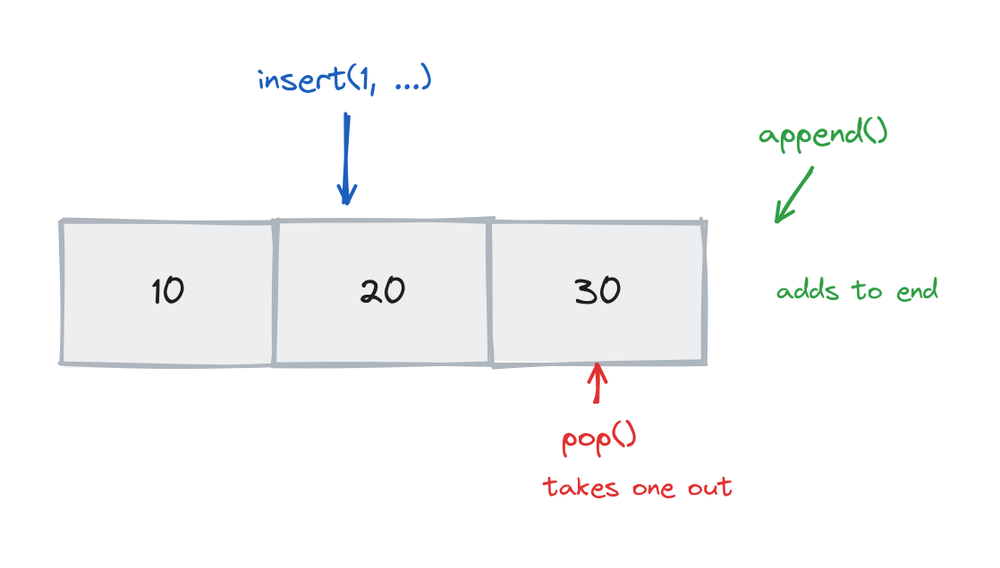
Here's the difference people mix up. append([3, 4]) puts the whole list in as one item. extend([3, 4]) adds the items inside it:
a = [1, 2]
a.append([3, 4])
print(a)
# Output: [1, 2, [3, 4]]

b = [1, 2]
b.extend([3, 4])
print(b)
# Output: [1, 2, 3, 4]
Use append to add one thing, and extend to add many things from another list.
Removing items from a list
There are also three main ways to remove items.
remove() deletes the first item that matches a value:
r = ["a", "b", "c", "b"]
r.remove("b")
print(r)
# Output: ['a', 'c', 'b']
Only the first "b" is gone. The second one stays. If the value isn't in the list at all, remove() raises an error:
x = [1, 2]
x.remove(9)
# ValueError: list.remove(x): x not in list
pop() removes an item by its index and gives it back to you. With no index, it removes the last item:
r = ["a", "c", "b"]
last = r.pop()
print(last)
# Output: b

print(r)
# Output: ['a', 'c']
del is a keyword, not a method. It deletes an item at an index, but it does not hand the value back:
s = [1, 2, 3, 4]
del s[0]
print(s)
# Output: [2, 3, 4]
Pick remove when you know the value, pop when you know the position and want the item, and del when you just want it gone.
Getting the length with len()
The len() function tells you how many items a list has:
fruits = ["apple", "banana", "cherry"]
print(len(fruits))
# Output: 3
This is useful all the time, for checking if a list is empty (its length is 0) or for working with the last index (which is always len(list) - 1).
Checking if an item is in a list
The in keyword checks whether a value is in the list. It gives back True or False:
menu = ["tea", "coffee", "juice"]
print("tea" in menu)
# Output: True

print("water" in menu)
# Output: False
This is the safe way to check before you do something. For example, check "water" in menu before calling menu.remove("water"), so you don't hit the error from earlier. The result is a boolean, which fits straight into an if statement.
Looping over a list
Most of the time you don't want one item, you want to do something with every item. A for loop walks through the list one item at a time:
for item in ["x", "y", "z"]:
    print(item)
# Output:
# x
# y
# z
On each pass, the variable item holds the next value from the list. The loop stops on its own when it reaches the end. You'll use lists and loops together often, so this pattern is worth getting comfortable with early.
Lists inside lists
A list item can itself be a list. This gives you a grid, which is how you'd store a table of rows and columns:
grid = [[1, 2, 3], [4, 5, 6]]
print(grid[0])
# Output: [1, 2, 3]
grid[0] gives you the whole first row, which is a list. To reach a single value, use two sets of brackets. The first picks the row, the second picks the item in that row:
grid = [[1, 2, 3], [4, 5, 6]]
print(grid[1][2])
# Output: 6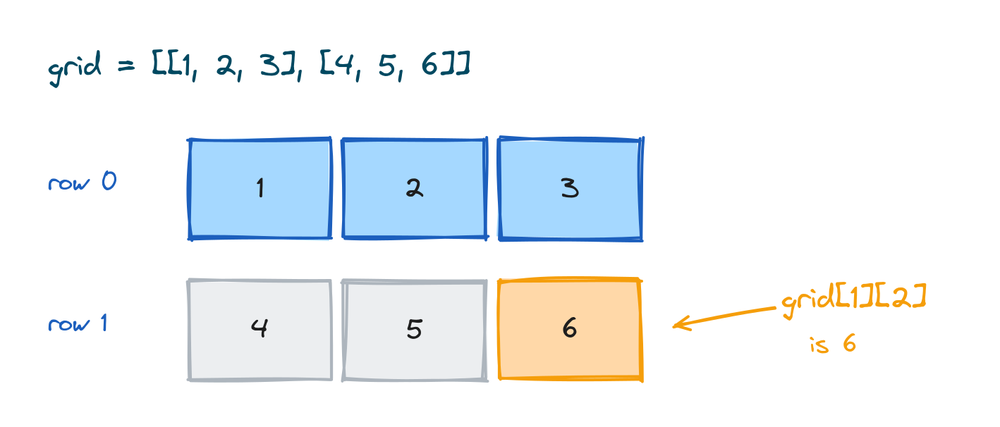
Read grid[1][2] from left to right. grid[1] is the second row, [4, 5, 6]. Then [2] takes the item at index 2 of that row, which is 6.
The copy trap you need to know
This one confuses nearly every beginner once. When you write b = a with a list, you do not get a second list. You get a second name for the same list. Change one and the other changes too:
a = [1, 2, 3]
b = a
b.append(4)
print(a)
# Output: [1, 2, 3, 4]

print(b)
# Output: [1, 2, 3, 4]
Both a and b point at one list in memory, so appending through b shows up in a. To get a real separate copy, use .copy():
c = [1, 2, 3]
d = c.copy()
d.append(4)
print(c)
# Output: [1, 2, 3]

print(d)
# Output: [1, 2, 3, 4]
Now c is untouched. The list() function does the same thing, so d = list(c) also makes a fresh copy:
c = [1, 2, 3]
e = list(c)
print(e)
# Output: [1, 2, 3]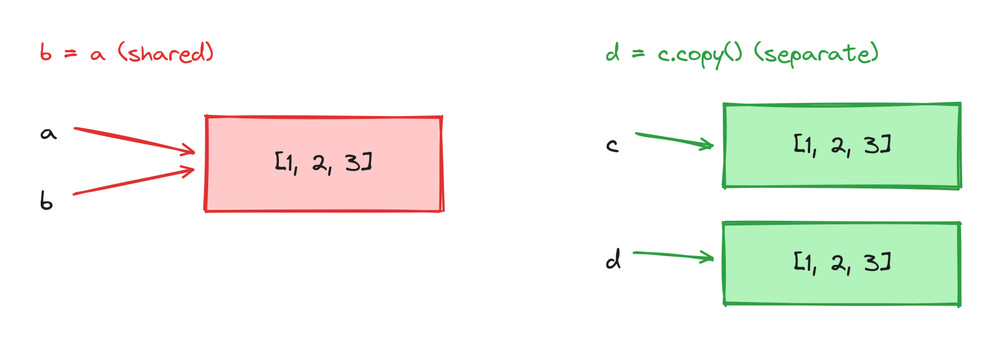
The rule is simple. Plain b = a shares the list. Use .copy() or list(a) when you want a copy you can change on its own. This is different from how variables holding plain numbers behave, where a copy is always separate.
Lists versus tuples
A tuple looks a lot like a list, but it uses round brackets and you cannot change it after you make it. Try to change a tuple and Python stops you:
t = (1, 2, 3)
t[0] = 9
# TypeError: 'tuple' object does not support item assignment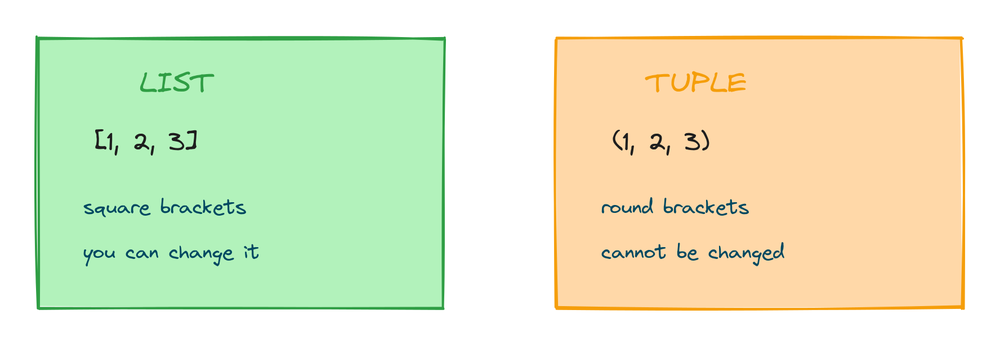
So which do you use? Here's the short comparison:
| Feature | List | Tuple |
|---|---|---|
| Brackets | [ ] | ( ) |
| Can you change it? | Yes | No |
| Ordered | Yes | Yes |
| Allows duplicates | Yes | Yes |
| Use it for | Data that changes | Data that stays fixed |
Use a list when the data will change, and a tuple when it should stay the same. A shopping list grows and shrinks, so it's a list. A pair of map coordinates never changes, so a tuple fits better.
Practice exercises
Try each one yourself before you open the solution. Everything you need is above.
Read the second item
Given a list of animals, print the second one.
# Solution
animals = ["cat", "dog", "cow", "hen"]
print(animals[1])
# Output: dog
Add to both ends
Start with [2, 3, 4]. Add 5 to the end and 1 to the front, then print it.
# Solution
nums = [2, 3, 4]
nums.append(5)
nums.insert(0, 1)
print(nums)
# Output: [1, 2, 3, 4, 5]
Remove one color
Remove "green" from the list and print what's left.
# Solution
colors = ["red", "green", "blue"]
colors.remove("green")
print(colors)
# Output: ['red', 'blue']
Count and check
Print how many items the basket has, then check if "pear" is in it.
# Solution
basket = ["apple", "apple", "pear"]
print(len(basket))
print("pear" in basket)
# Output:
# 3
# True
Read from a grid
Given a grid of pairs, print the first item of the third row.
# Solution
grid = [[1, 2], [3, 4], [5, 6]]
print(grid[2][0])
# Output: 5
Common mistakes
- Counting from 1. The first item is at index 0, not 1. So
colors[1]is the second color, not the first. - Going past the end. A list of three items has indexes 0, 1, 2. Asking for
colors[3]raisesIndexError: list index out of range. - Mixing up append and extend.
append([3, 4])adds the list as one item.extend([3, 4])adds 3 and 4 as separate items. - Thinking
b = amakes a copy. It doesn't. Both names point at the same list. Use.copy()orlist(a)for a real copy. - Removing a value that isn't there.
remove()raisesValueErrorif the value is missing. Check withinfirst. - Trying to change a tuple. Tuples can't be changed. If you need to edit the data, use a list.
Frequently asked questions
How do I create a list in Python?
Put the items in square brackets with commas between them, like fruits = ["apple", "banana"]. An empty list is []. You can also build one from another collection with list().
Can a Python list hold different types?
Yes. One list can hold numbers, text, booleans, and even other lists at the same time, like [1, "hi", 3.5, True]. Python doesn't force all items to be the same type.
What is the difference between append and extend?
append() adds a single item to the end. extend() takes another list and adds each of its items separately. So append([3, 4]) adds one list item, while extend([3, 4]) adds 3 and 4.
How do I copy a list?
Use b = a.copy() or b = list(a). Both make a separate list. Writing b = a does not copy it, it makes a second name for the same list, so changing one changes the other.
What is the difference between remove, pop, and del?
remove() deletes the first item that matches a value. pop() deletes an item by index and returns it. del deletes an item by index without returning it.
How do I get the number of items in a list?
Use len(), as in len(fruits). It returns the count of items. An empty list has a length of 0.
What is the difference between a list and a tuple?
A list uses square brackets and can be changed after you make it. A tuple uses round brackets and cannot be changed. Use a list for data that changes and a tuple for data that stays fixed.
How do I check if an item is in a list?
Use the in keyword, like "tea" in menu. It returns True if the value is in the list and False if it isn't.
Key takeaways
- A list holds many items in order, inside square brackets. It's ordered, changeable, and allows duplicates.
- You read items by index starting at 0, and negative indexes count from the end, so
list[-1]is the last item. - Add items with
append(one item),insert(at a position), orextend(items from another list). Remove them withremove,pop, ordel. len()counts items, theinkeyword checks membership, and aforloop walks through every item.- Writing
b = ashares one list between two names. Use.copy()orlist(a)to get a real copy.
Lists and tuples are the two collections every Python beginner learns first. A tuple is the fixed version, the one you use when the data should never change. See how the two compare in practice in the guide to Python tuples.