

 By Kaustubh Saini
Type 3 ^ 2 into Python expecting 9 and you get 1. The ^ symbol isn't power in Python (power is **). It's a bitwise operator, one of six that work on numbers at the level of their binary digits.
Python's bitwise operators are &, |, ^, ~, <<, and >>, and they act on each bit of a number, one column at a time. They look cryptic until you see the bits laid out, and then they're simple. This lesson lays them out, shows what each operator does, and ends with the real jobs they're used for, like storing many on-off settings in a single number.
Numbers are bits underneath
Your computer stores every number in binary, as a row of 0s and 1s called bits. The number 6 is 110 in binary: one 4, one 2, no 1. The number 3 is 011: no 4, one 2, one 1.
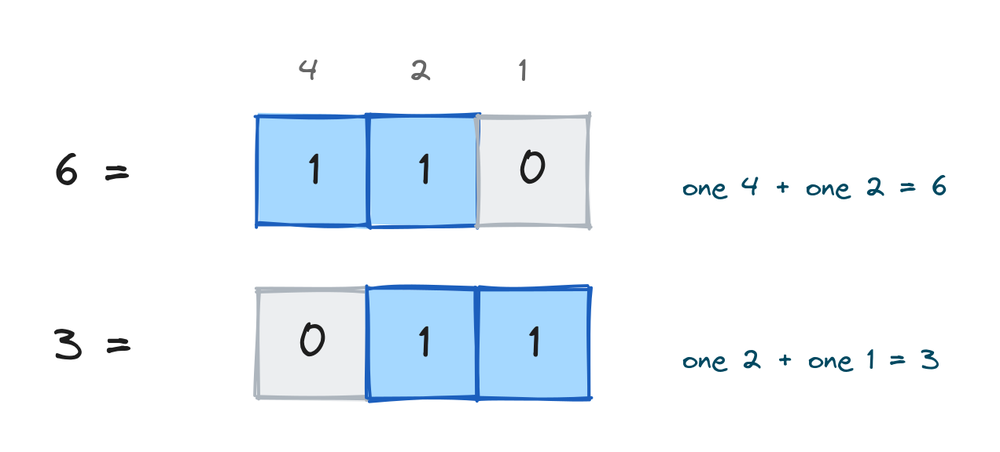
You can ask Python to show any number in binary. bin() gives it with a 0b prefix, and an f-string with the b spec gives just the digits (there's more on that in Python string formatting):
print(bin(6))
print(f"{6:b}")
print(f"{3:04b}")
# Output:
# 0b110
# 110
# 0011
Keep bin() nearby while you read this lesson. Printing the bits before and after each operation is the fastest way to understand what happened.
The six operators at a glance
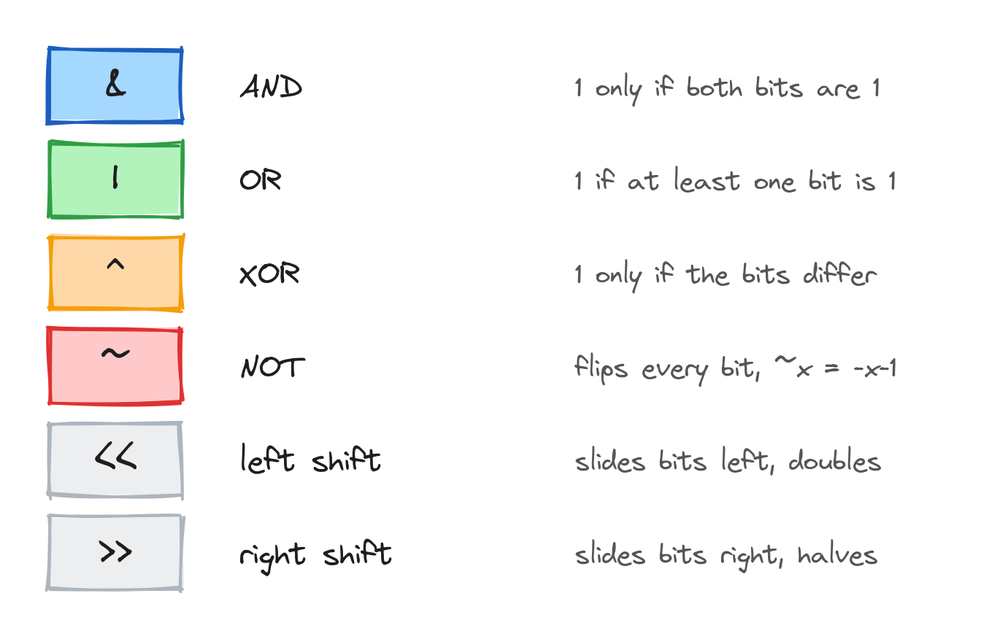
| Operator | Name | What it does to each bit column |
|---|---|---|
& | AND | 1 only if both bits are 1 |
| | OR | 1 if at least one bit is 1 |
^ | XOR | 1 only if the bits are different |
~ | NOT | flips every bit (and the sign, see below) |
<< | left shift | slides all bits left, doubling the number |
>> | right shift | slides all bits right, halving the number |
Bitwise AND (&)
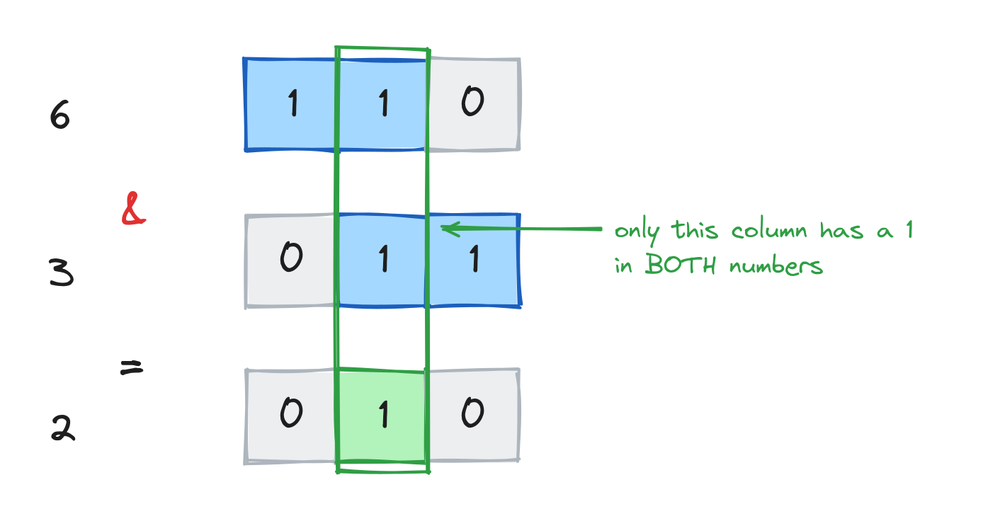
a & b compares the two numbers column by column. A column becomes 1 only when both numbers have a 1 there:
print(6 & 3)
print(f"{6:03b} & {3:03b} = {6 & 3:03b}")
# Output:
# 2
# 110 & 011 = 010
Only the middle column has a 1 in both numbers, so the answer is 010, which is 2. Because AND keeps only the columns you ask for, people describe it as a filter or "mask". The classic one-liner: n & 1 is 1 for odd numbers and 0 for even, because it keeps only the last bit:
print(7 & 1)
print(8 & 1)
# Output:
# 1
# 0
Bitwise OR (|)
a | b puts a 1 in every column where either number has one:
print(6 | 3)
print(f"{6:03b} | {3:03b} = {6 | 3:03b}")
# Output:
# 7
# 110 | 011 = 111
Every column has at least one 1, so the result is 111, which is 7. OR is how you switch bits on without touching the others, and that's the heart of the flags section coming up.
Bitwise XOR (^)
a ^ b puts a 1 where the two bits are different:
print(6 ^ 3)
print(f"{6:03b} ^ {3:03b} = {6 ^ 3:03b}")
# Output:
# 5
# 110 ^ 011 = 101
XOR has two properties worth knowing. A number XOR itself is 0, and applying the same XOR twice undoes it:
print(5 ^ 5)
print(5 ^ 3 ^ 3)
# Output:
# 0
# 5
That undo property makes XOR a toggle switch: apply it once to turn something on, apply it again to turn it off. It also powers a well-known interview question, finding the one number that appears once in a list where everything else appears twice.
Bitwise NOT (~)
~ flips every bit, and in Python that comes with a surprise:
print(~6)
print(~0)
# Output:
# -7
# -1
Why negative? Computers store negative numbers using a scheme called two's complement, and in that scheme flipping every bit of x gives -x - 1. You don't need the scheme's details yet. Just remember the rule: ~x equals -x - 1, so ~6 is -7 and ~-3 is 2. In practice ~ mostly appears combined with & to switch a bit off, which you'll see below.
Shift operators (<< and >>)
Shifts slide the whole row of bits left or right. Each step left doubles the number, each step right halves it and drops the remainder:
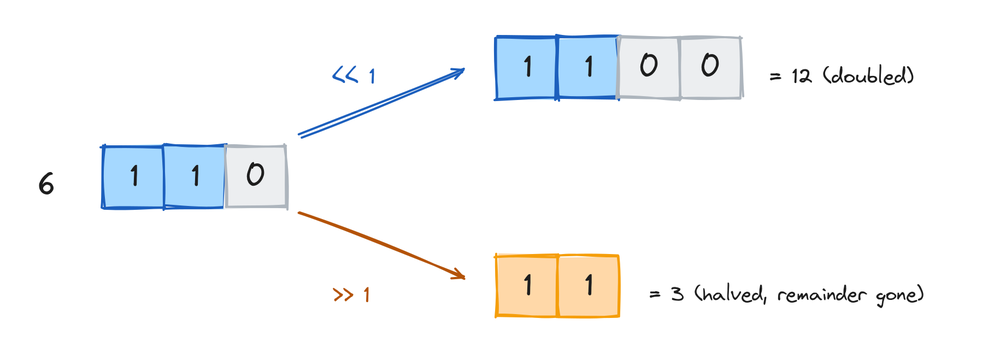
print(6 << 1)    # 110 becomes 1100
print(6 << 2)
print(6 >> 1)    # 110 becomes 11
print(7 >> 1)    # the lost bit is thrown away
# Output:
# 12
# 24
# 3
# 3
So x << n is x times 2 to the power n, and x >> n is floor division by 2 to the power n. In Python you'd normally just write the multiplication, but shifts are everywhere in code that packs data into bytes, like file formats and network messages.
Bitwise is not logical
& and and are different operators for different jobs. and works with booleans and questions, & works with the bits of numbers:
print(True and False)
print(6 & 3)
# Output:
# False
# 2
There's also an order-of-operations surprise. Arithmetic runs before shifts, so this line doesn't do what it looks like:
print(1 << 2 + 3)
print((1 << 2) + 3)
# Output:
# 32
# 7
The first line computes 2 + 3 first, then shifts 1 left by 5 places. When you mix bitwise operators with arithmetic, put parentheses around the part you want done first. They cost nothing and remove the guesswork.
Real use, many settings in one number
The main everyday job for bitwise operators is storing a set of yes-no options in a single integer. Give each option a bit, and one number carries them all. File permissions work exactly like this:
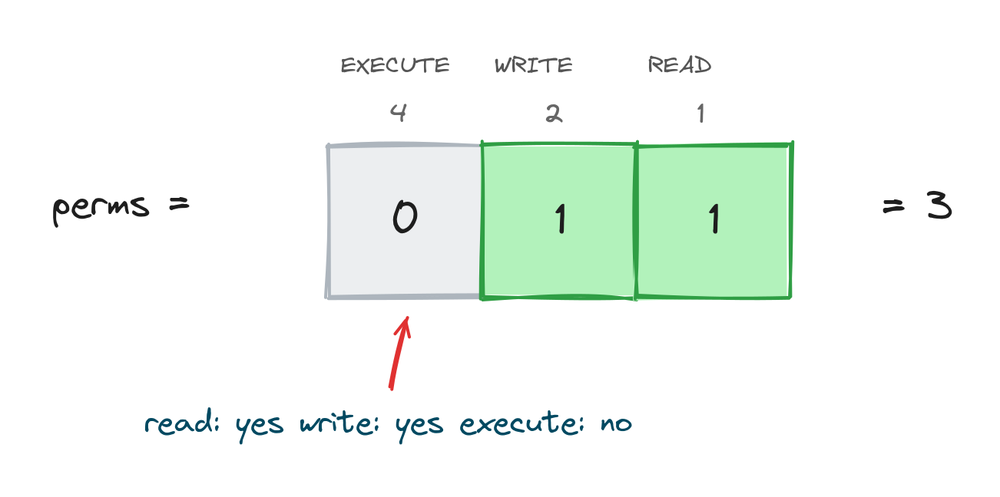
READ = 1     # 001
WRITE = 2    # 010
EXECUTE = 4  # 100

perms = READ | WRITE          # combine with OR
print(perms)
print(bool(perms & WRITE))    # check with AND
print(bool(perms & EXECUTE))
# Output:
# 3
# True
# False
The four standard moves, using the operators from this lesson:
perms = READ | WRITE

perms = perms | EXECUTE    # switch a bit on
print(perms)
perms = perms & ~WRITE     # switch a bit off
print(perms)
perms = perms ^ READ       # toggle a bit
print(perms)
# Output:
# 7
# 5
# 4
Each of these has an in-place form too: |=, &=, ^=, <<=, and >>=, matching += from arithmetic. You'll meet this flags pattern in real libraries, like the re module's re.IGNORECASE | re.MULTILINE.
Practice exercises
Try each one before you look at the solution. bin() is your friend here.
Work out the AND
Compute 12 & 10 on paper using binary (12 is 1100, 10 is 1010), then check with Python.
# Solution
print(12 & 10)
print(f"{12:04b} & {10:04b} = {12 & 10:04b}")
# Output:
# 8
# 1100 & 1010 = 1000
Odd or even without %
Use & to check whether 99 is odd.
# Solution
print(99 & 1)
# Output: 1
Double it with a shift
Turn 5 into 20 using one shift.
# Solution
print(5 << 2)
# Output: 20
Predict the NOT
Without running it, work out ~10 using the rule from this lesson. Then run it.
# Solution
print(~10)
# Output: -11
Build a permission check
With READ = 1, WRITE = 2, EXECUTE = 4, make perms hold read and execute, then check it does NOT have write.
# Solution
READ = 1
WRITE = 2
EXECUTE = 4
perms = READ | EXECUTE
print(bool(perms & WRITE))
# Output: False
Common mistakes
- Using
^for power.3 ^ 2is 1, not 9. Power in Python is**. This is the single most common bitwise surprise. - Confusing
&withand.andis for conditions,&is for bits. They can give different answers on the same values. - Skipping parentheses when mixing with arithmetic.
1 << 2 + 3is 32, because the addition runs before the shift. Write(1 << 2) + 3when that's what you mean. - Being surprised by
~.~xis-x - 1, so it's almost always negative. If you wanted "flip only these n bits", combine XOR with a mask, likex ^ 0b1111. - Expecting
>>to keep remainders. Bits pushed off the right edge are gone.7 >> 1is 3, not 3.5. - Reading flag numbers as counts. In the flags pattern, 5 doesn't mean five of anything. It means bits 1 and 4 are on. Print with
bin()when debugging flags.
Frequently asked questions
What are bitwise operators in Python?
Operators that work on the binary digits of integers: & (AND), | (OR), ^ (XOR), ~ (NOT), and the shifts << and >>. Each compares or moves bits column by column.
Why does 3 ^ 2 give 1 in Python?
Because ^ is XOR, not power. In binary, 11 ^ 10 is 01, which is 1. For 3 squared, write 3 ** 2.
What is the difference between & and and?
& works on the bits of numbers and returns a number. and works on truth values and returns one of its operands. Use and in if statements, & for bit work.
Why is ~5 equal to -6?
Python stores negative numbers in two's complement, and flipping every bit of x in that system gives -x - 1. So ~5 is -6 and ~-3 is 2.
What does << do in Python?
Left shift. It slides the bits left, so x << n multiplies x by 2 to the power n. 5 << 1 is 10.
How do I see a number in binary?
bin(n) returns a string like 0b110. For just the digits, or fixed width, use an f-string spec: f"{n:08b}" shows 8 bits.
What is a bitmask?
A number you design so its 1 bits mark the positions you care about. You then use & to read those positions, | to set them, and ^ to flip them. The permissions example in this lesson is a bitmask.
When will I actually use bitwise operators?
Flags and settings packed into one integer, working with bytes in files and network data, performance tricks like n & 1 for odd checks, and a family of interview problems. Day to day, less often than arithmetic, but when they fit, nothing else is as clean.
Key takeaways
- Bitwise operators act on integers one binary column at a time:
&needs both bits,|needs either,^needs them different. ^is XOR, not power. Power is**.~xequals-x - 1, and<</>>double and halve by sliding bits.- Arithmetic runs before shifts, so parenthesize when you mix them:
(1 << 2) + 3. - The flags pattern stores many yes-no settings in one number: set with
|, check with&, clear with& ~, toggle with^.
Bitwise operators are the specialist corner of a much bigger family. For the everyday ones, arithmetic, comparisons, logic, and the rules for mixing them, go back through Python operators.